
01What makes the Studio different
No Elgato software, anywhere in the chain — Fantago talks to the deck directly, over the network.
Every other Stream Deck — Mini, the standard 15-key, the XL — is a USB HID device: something has to be plugged into it and running Elgato's own software (or the Fantago plugin that replaces it) to talk to the hardware at all. The Stream Deck Studio is built differently: it has an Ethernet port, and once it is on your network, Fantago's server opens a plain TCP connection straight to it on port 5343 — no Elgato software installed anywhere, no USB cable, no companion app running on the deck or next to it.
Connect over LAN
Just the Studio's IP address. Fantago opens the connection, sends a short handshake, and starts rendering keys.
Split the deck in two
16×2 keys can act as two independent 8-key regions — two operators, or two different contexts, on one physical unit.
Render real graphics per key
Each key is a 144×112 image, drawn server-side per press and per feedback change, not a fixed icon set.
Need the Elgato Stream Deck software running
Anywhere — not on the machine running Fantago, and nothing to install on the Studio itself.
02Five minutes to a working profile
- Put the Studio on your network and note its IP address — check it on the device itself or your router's client list.
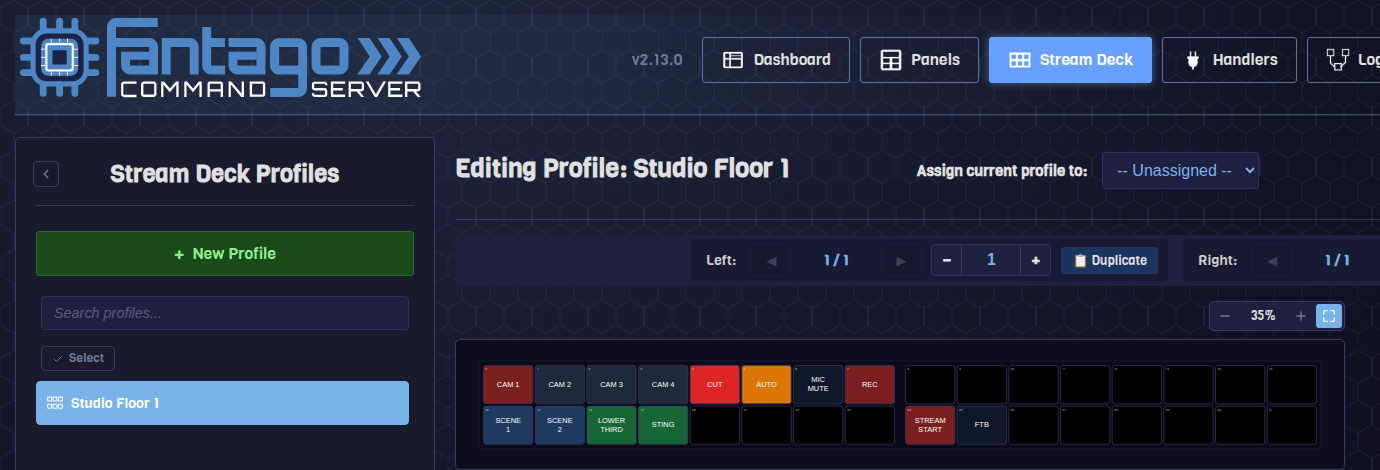
- Stream Deck → New Profile. Name it, set Device Type to Stream Deck Studio (16×2).
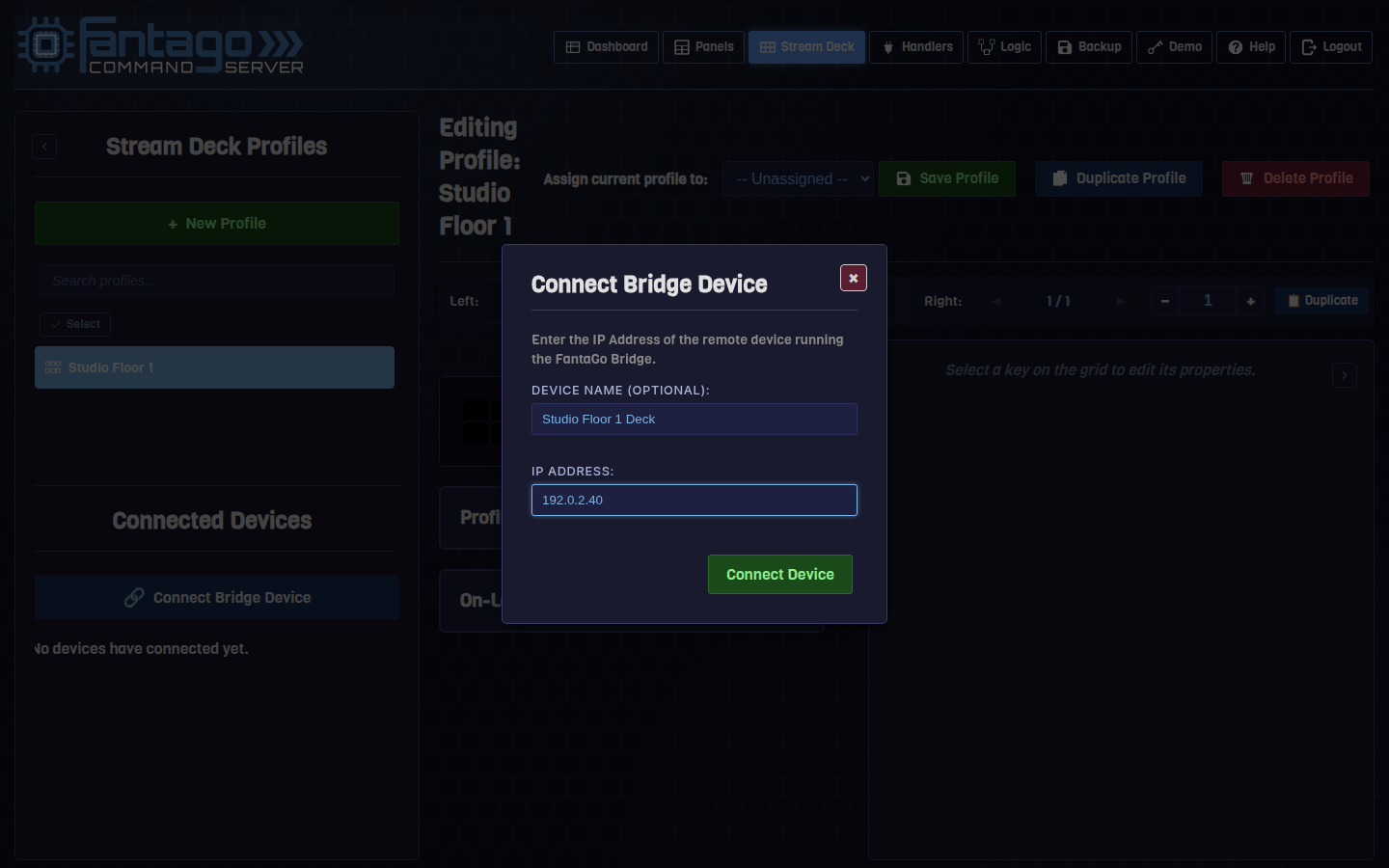
- Connect Bridge Device. In the profile's Connected Devices panel, press it, give the connection a name and the Studio's IP, and press Connect Device. There is nothing to install — see the note below on why the button says "Bridge".
- Build keys exactly as on any other Stream Deck profile: select a key on the grid, assign an action, set its label and feedback rule.
- Save Profile and assign it to the connected device. Keys render on the physical deck within a second or two.
03Why it says "Bridge"
One dialog, two different situations underneath it — worth knowing which one you're in.
The dialog is called Connect Bridge Device and its copy talks about "the remote device running the FantaGo Bridge" — wording that made more sense for other kinds of remote surfaces than it does for a Studio, and is worth unpacking so it doesn't cause a moment of doubt about whether you need to install something.
"FantaGo Bridge" is not a piece of software that runs on the Stream
Deck, and there is nothing to install on the Studio or next to it. It is the name of
the component inside the Fantago server itself (SurfaceBridge) that
opens outbound network connections to physical surfaces instead of talking to them
over USB. For a Stream Deck Studio, entering its IP in this dialog is the entire
setup — the "Bridge" is server-side, and the Studio is simply the address it
connects to.
04Split mode: two decks in one
The 16×2 grid can behave as one continuous 32-key surface, or as two independent 8-key halves.
With split mode on — the default for a new Studio profile — the grid divides into a Left region and a Right region, each with its own page counter and its own Duplicate control. That turns one physical Studio into two practical surfaces: a technical director's transport controls on the left half and a graphics operator's titles on the right, both live on the same desk, each paging independently without disturbing the other's layout.
05What actually draws on a key
Every key is a rendered image, not a fixed icon from a library.
A key's face is generated as a small SVG (144×112) — text, colour, an icon, optional drop shadow — and rasterized server-side each time it needs to change: on save, on feedback state change, or when a Logic Flow's Style node overrides it at runtime. Because rendering happens on the server and the result is pushed to the deck, the same button-building tools used for browser panels — colour, label, icon, blink — work identically on a Stream Deck Studio key.
06Frequently asked questions
The connection shows green briefly then drops
Fantago only marks a Studio connected once real data has arrived from it, not on a successful TCP handshake alone — a half-open link or a stale switch entry can accept the connection without the device actually being there. If it flaps, check the Studio's network link and that nothing else on the network is contending for the same IP.
Do I need the same network as the machine running Fantago?
The Studio needs a route to the Fantago server on TCP port 5343 — same subnet is simplest, but any network that can reach that port works.
Can I use split mode with fewer than 16 keys per side?
Each region is fixed at 8 keys (2 rows × 4 columns) per side; what changes with split mode is whether the two halves page independently, not how many keys each has.
Does a Studio profile support feedback rules the same way as other decks?
Yes — the same feedback-rule mechanism used for the smaller Stream Deck models and for panel buttons applies unchanged; a key lights from a device's live state exactly as a panel button would.