
Broadcast Control Software Features
A modular broadcast control software built for professional live production — connect and automate any device, any protocol.
What Fantago does
A live production is rarely built from one manufacturer's equipment. A typical control room runs a vision mixer from one vendor, recorders from another, PTZ cameras from a third, a lighting desk that speaks OSC, a projector that speaks PJLink and a playout system with its own REST API. Each of them ships with its own control application, and none of those applications talk to each other.
Fantago is the layer that sits between them. It connects to every device over its native protocol, exposes each one as a set of named actions, and lets you fire those actions from wherever makes sense for the job: a custom touch panel on a tablet, a physical Stream Deck key, a scheduled event, a message from another system, or a logic flow that reacts to something changing elsewhere in the rig.
It runs as a normal application on a machine you already own — a control room PC, a Mac, a Linux box or a Raspberry Pi — and everything stays on your network. There is no cloud service in the middle, no account to keep alive and no subscription. Below is what the software actually gives you.
Unified Orchestration Hub
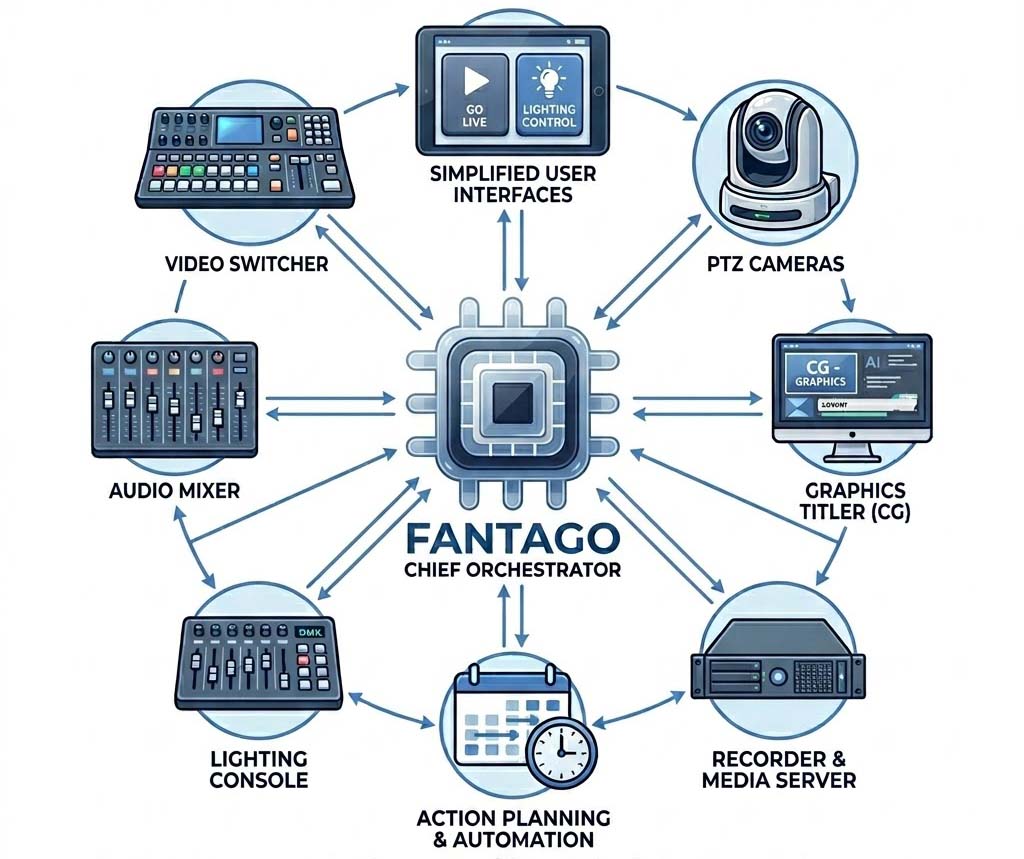
Fantago serves as the central nervous system of your production environment. It bridges the gap between disparate hardware and software, allowing you to orchestrate complex workflows from a single, stable platform.
Whether you are managing a small podcast studio or a multi-room broadcast facility, Fantago ensures every component works in perfect harmony.
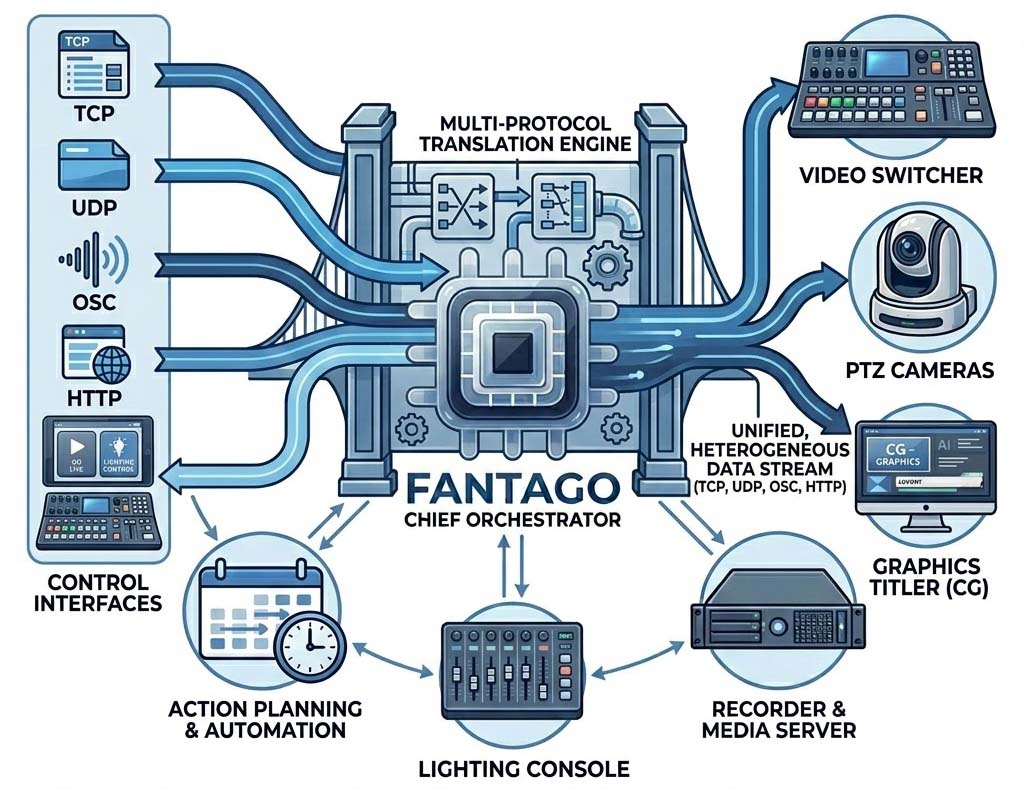
Multi-Protocol Translation Engine
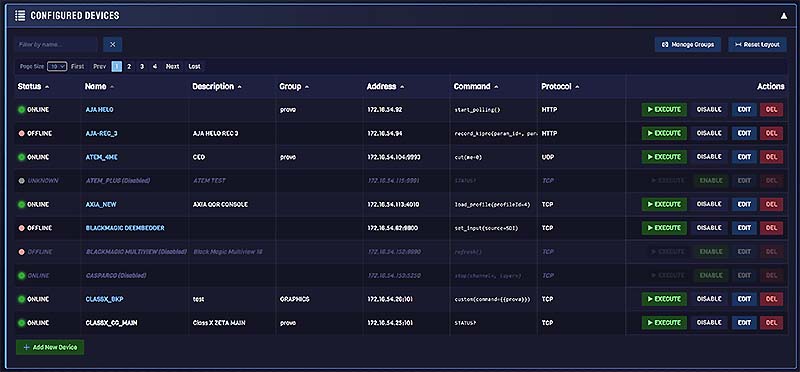
Eliminate compatibility headaches forever. Fantago speaks the native language of your gear over raw TCP and UDP, OSC (both UDP and TCP framing), and HTTP / HTTPS REST — with WebSocket handled by the handlers that need it, such as OBS Studio, Resolume Arena and Shelly Gen2/Gen3 devices.
It acts as a universal translator, enabling devices from different manufacturers to communicate and interact as if they were part of the same ecosystem. A tally change on an ATEM can roll a HyperDeck, dim a lighting cue and flip a projector input, even though none of those four devices has ever heard of the others.
Fantago ships with 55 ready-made device handlers covering switchers, recorders, routers, PTZ cameras, lighting consoles, audio mixers, media servers and projectors. When your device is not on the list, you can build a handler for it yourself — no coding required for simple command sets, or a full JavaScript plugin when you need logic and feedback parsing.
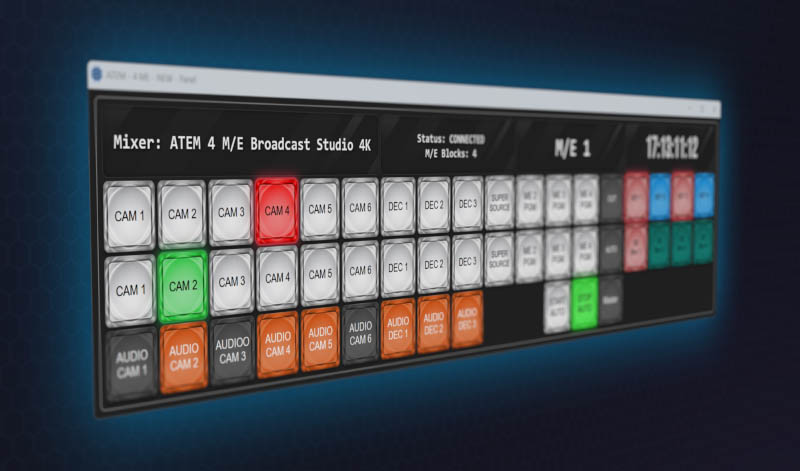
Bespoke Virtual Panel Designer
Build the interface you have always wanted. Use the intuitive drag-and-drop editor to create custom web-based control panels tailored for specific operator roles.
Access your panels from any device with a web browser — PC, tablet, or smartphone — exposing only the controls each operator needs.
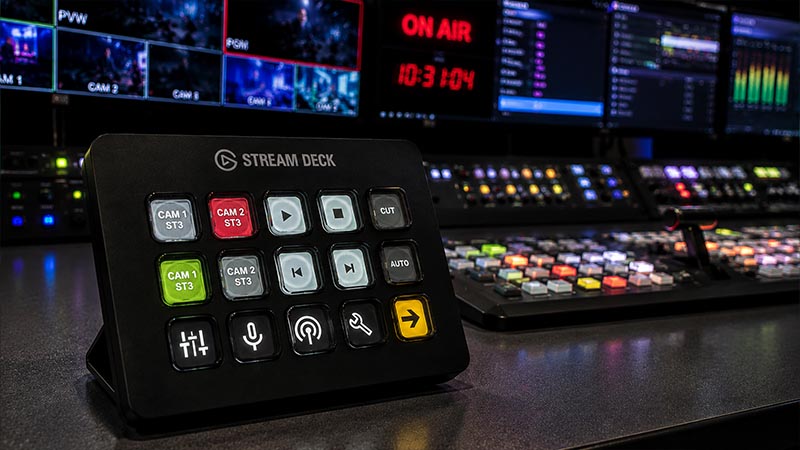
Native Hardware Integration
Experience the tactile reliability of professional hardware. Fantago features deep, native integration for Elgato Stream Deck (Studio, XL, MK.2 and more).
Leverage dynamic LCD keys, rotary encoders and real-time feedback to create a physical control surface that responds instantly to every device state change.
The World's First AI-Assisted Broadcast Orchestrator. BETA
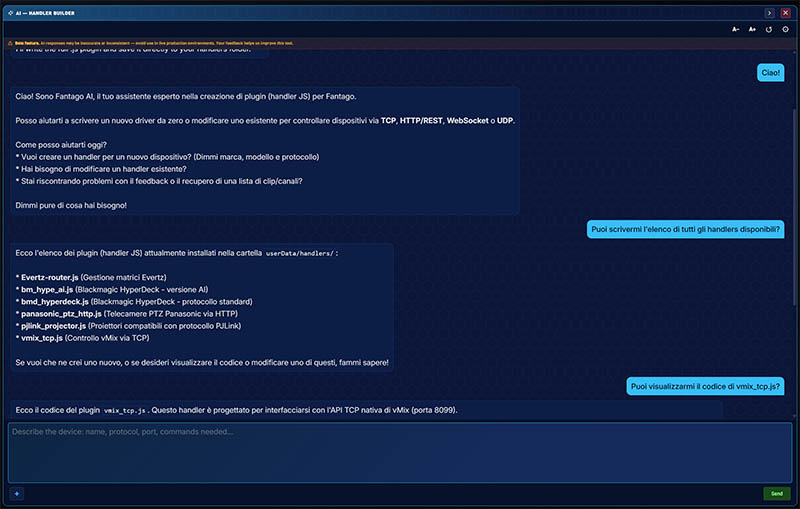
Fantago integrates a native AI assistant that doesn't just answer questions — it acts. Send commands to your devices, adjust timers, modify sequences, update variables, or build entire automation workflows, all in natural language. No menus. No clicks. Just tell it what you need.
But the real power is in the Advanced Handler Builder: ask the AI to generate a complete device plugin from scratch. Describe your device, paste a protocol spec or a PDF manual, and the AI writes a fully functional handler — ready to deploy in seconds.
And unlike cloud-only AI tools, Fantago works with local AI models too. Zero cost, zero internet dependency, zero data leaving your facility.
Variables and Visual Logic Flows
Every device you connect publishes its state back into Fantago as named variables — which input is on program, whether a deck is recording, what a projector's lamp is doing, how much power a smart plug is drawing. Those variables are live: they update the moment the device changes, whether the change came from Fantago or from someone pressing a button on the hardware itself.
The Logic Flow builder turns those variables into behaviour. You drag nodes onto a canvas and wire them together — more than 35 building blocks covering triggers, comparisons, maths, string handling, timers, counters, gates, branches, delays, HTTP requests and JSON parsing. No scripting, no compile step; a flow starts working the moment you save it.
The result is a system that reacts on its own: hold a button to ramp a colour channel, block a command unless the studio is live, restart an encoder when it drops offline, send an email if a recording never started, or push a song title arriving over REST straight onto a character generator.
A Teleprompter the Gallery Can Drive
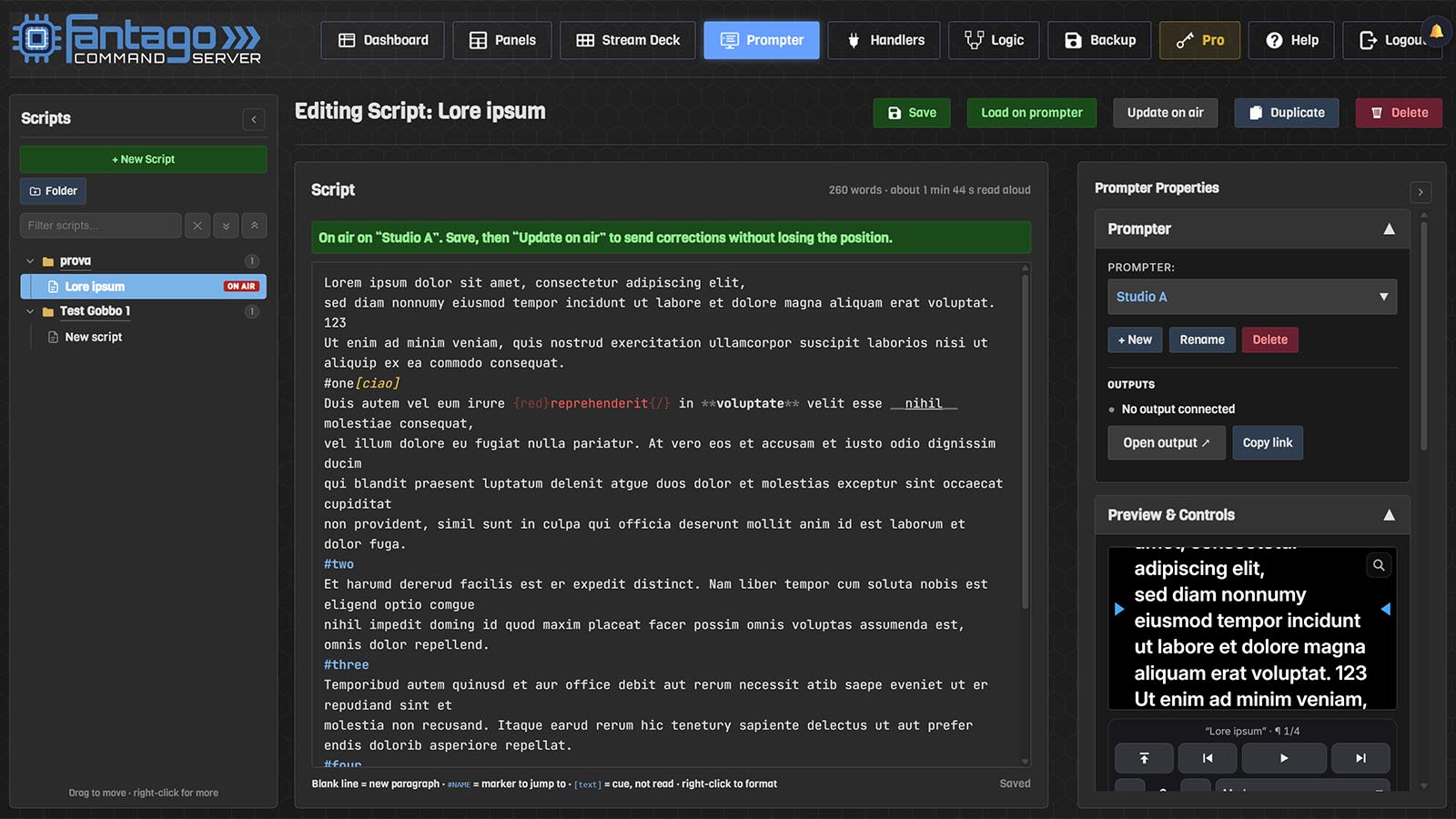
Fantago includes a teleprompter. The script is written in Fantago — a library in folders, markers to jump to, cues in brackets that are never read aloud — and shown full screen on the prompter monitor, a tablet, a phone, or in the free Fantago Display viewer for a dedicated prompter computer.
Because a prompter is a device like any other, it is driven from the surfaces that already run the show: play, speed, paragraphs, markers, text size, mirror and blank on panel buttons, Stream Deck keys, Stream Deck + dials and logic flows. Several screens can show the same script, all kept on the same words, mirrored for a beam-splitter hood where the rig needs it.
Automation & Intelligence
From simple one-click macros to complex time-based logic — automate your entire broadcast workflow without writing a single line of code.
Advanced Macro & Sequence Builder
Transform complex multi-step operations into a single click. Chain commands across different devices and protocols. Set delays, insert conditional logic, and execute professional-grade transitions with precision.
Precision Scheduling & Logic
Put your production on autopilot. Automate commands based on specific dates, times, or recurring intervals. Perfect for 24/7 channels, automated streaming starts, or routine equipment resets.
Intelligent Event Triggers
Make your system reactive. Listen for external events — a schedule file published by another system, a specific network packet, a device status change — to trigger immediate actions automatically.
Bidirectional System Feedback
Fantago does not just send commands; it listens. Real-time bidirectional feedback updates your virtual panels and physical buttons instantly when a device state changes anywhere in the system.
Network Triggers & REST API
Drive Fantago from anything that can open a socket or make an HTTP call. Playout automation, an existing MCR system, a rundown tool or a simple script can fire any action by name, and Fantago can listen on TCP or UDP for incoming messages from your own gear.
File Triggers
Let another system write your running order. Fantago checks a folder — local, a network share or an HTTP URL — for a dated text file, one line per action: a time, a target and a command. A playout automation, a traffic system or a nightly script can drop tomorrow's schedule, and Fantago fires each device command, sequence and variable change at the right second. Files are re-read once a minute and cleaned up automatically after 30 days.
Runs on your hardware, stays on your network
Fantago installs on Windows 10 and 11, macOS (Apple Silicon and Intel), Linux x86 and Raspberry Pi. It runs as a normal service on the machine, serves its interface over your LAN, and keeps working when the internet does not — which matters when the show has to go on regardless of what the building's uplink is doing.
Nothing about your production leaves your facility. There is no cloud relay, no telemetry of your device configuration, no account that has to stay logged in. The licence is activated once and then runs offline forever, so a network outage or a change of provider cannot take your control room down.
The interface is served as a web app, so any browser on the network can reach it — a control room PC, a producer's laptop, an iPad taped to a camera trolley. Panels scale to the screen they are opened on and can be locked into fullscreen on a tablet so an operator cannot navigate away by accident.
Licensing is a single activation for a lifetime Pro licence, including future updates. Pricing is being announced shortly. There is no subscription, no per-device fee and no seat count: the 52 bundled handlers and every feature on this page are included. A 60-day free trial runs the full software with limits on how many devices, panels and sequences you can save, so you can prove it against your own equipment before paying anything.
Where Fantago is used
The same engine covers very different rooms — what changes is which devices are attached and who is pressing the buttons.
Broadcast & playout
Master control, channel branding and 24/7 playout. Schedule ident rolls, arm and disarm recorders, drive router salvos and keep tally in sync across a multi-room facility.
Live events & streaming
One operator running switcher, graphics, lighting and stream start/stop from a single surface, with a simplified panel handed to whoever is covering the next session.
Houses of worship
Volunteers who change every week need buttons that say what they do, not a dozen manufacturer apps. Build one panel per role and hide everything else.
Corporate AV & conference
Projectors, displays, PTZ cameras and room audio controlled together. A single "start meeting" button can power screens on, select an input and unmute the room.
Education & training studios
Teaching spaces where the equipment must survive being operated by students. Constrain what each panel can do and let logic flows prevent the combinations that break things.
Radio & visual radio
Automation systems, audio-over-IP nodes and studio cameras driven from the same desk, with on-air state feeding lights, signage and mic tally.
Frequently asked questions
Does Fantago need an internet connection?
Only once, to activate your licence. After that it runs entirely offline — the software, the device connections and the control panels all live on your own network. This is deliberate: a broadcast facility should not lose its control room because an uplink went down.
What if my device is not in the list of 55 handlers?
You can add it. For devices with a straightforward command set you build a handler through the interface without writing code. For anything that needs parsing, state tracking or feedback you write a JavaScript plugin — the Developer Guide covers both, and the built-in AI assistant can generate a working handler from a protocol document or PDF manual.
Do I need a Stream Deck to use Fantago?
No. The Stream Deck integration is optional. Everything can be driven from browser-based panels on any PC, tablet or phone, from schedules, from logic flows, or from another system over the REST API. The Stream Deck simply adds a physical surface with live feedback on the keys.
Is there a subscription?
No. Fantago Pro is licensed once rather than by subscription, with no per-device or per-seat charges, and future updates are included. Pricing is being announced shortly — see licensing.
How does Fantago compare to Bitfocus Companion?
Companion is free and open source with a large community module library; Fantago is commercial software with a visual panel builder, logic flows, scheduling, smart home control and direct support from the people who wrote it. We put together an honest, feature-by-feature comparison of the two.
Can it run on a Raspberry Pi?
Yes, and it is a common way to deploy it — a Pi tucked into a rack running Fantago continuously, with operators connecting from browsers elsewhere on the network. Builds are also available for Windows 10/11, macOS on Apple Silicon and Intel, and Linux x86.